
Instagram पर आज इतना content है की लोग अब Instagram को भी Search engine की तरह इस्तमाल करने लगे है लोगो की Profile search करना, Reels, Hashtag, Location और Keywords के जरिये Account, content लोग instagram के search bar से search करते है.
लेकिन Problem तब आती है जब:
- Purani search history suggestions में दिखने लगती है
- गलत या unwanted profiles बार-बार सामने आती हैं
- User को Privacy concern होता है
- Instagram algorithm गलत interest assume करने लगता है
इसलिए ऐसे मे आपको Instagram Search History delete करने का option दिया गया है. अगर आप भी चाहते हैं कि आपकी Instagram search history पूरी तरह clear हो जाए, तो यह guide आपके लिए है। इस guide हम आपको detail मे पूरी जानकारी देने वाले है की Instagram Search History Clear Kaise Kare?
Instagram Search History Kya Hoti Hai?

Instagram मे Search का ये जो option होता है ” Search with Meta Ai ” यहाँ Instagram User जिस भी Username को search करते है, Hashtag, location या keywords से search करते है वो सब कुछ Instagram history मे save होता जाता है.
जिस से instagram आपके interest को अच्छे से समझ पाए आपको fast suggestion मिले, similar content recommend हो, algorithm आपके interest को clearly समझ पाए और आपको आपकी पसंद का content दिखाने मे सफल हो. लकीन कई बार यही सब चीज़े problem भी बन जाती है.
आप चाहे तो आप instagram History delete कर के fresh content से start कर सकते है आये जानते है कैसे?
Instagram Search History Clear Kaise Kare (Step-by-Step)
Instagram Search History Clear करने के लिए आप अपने mobile मे वह Instagram Account Open करिये जिसकी History आपको Clear करनी है फिर right hand side मे profile icone पर Tap कर के instagram profile पर आ जाये.
Profile पर आने के बाद ऊपर right hand side corner मे three dot पर tap करें और Setting and Activities पर आ जाये. setting and activities मे थोड़ा सा scroll कर के आपको “How you use Instagram” section देखेगा यहाँ पर Your activity पर tap करें.
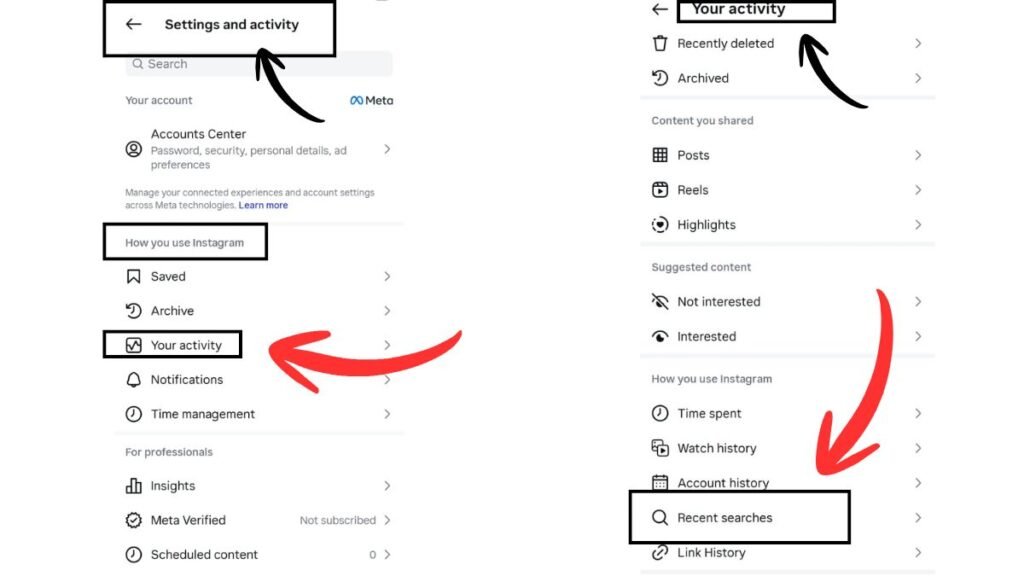
your Activity मे tap कर के जब अंदर आएंगे वहां आपको थोड़ा सा scroll करना है और last मे फिर से “How you use Instagram मे ” Recent Search” पर tap करना है.
Recent Search मे आपकी सभी Search history देख जायगी यहाँ से आप एक एक कर के भी delete कर सकते है या फिर clear all कर के एक साथ पूरी भी delete कर सकते है.
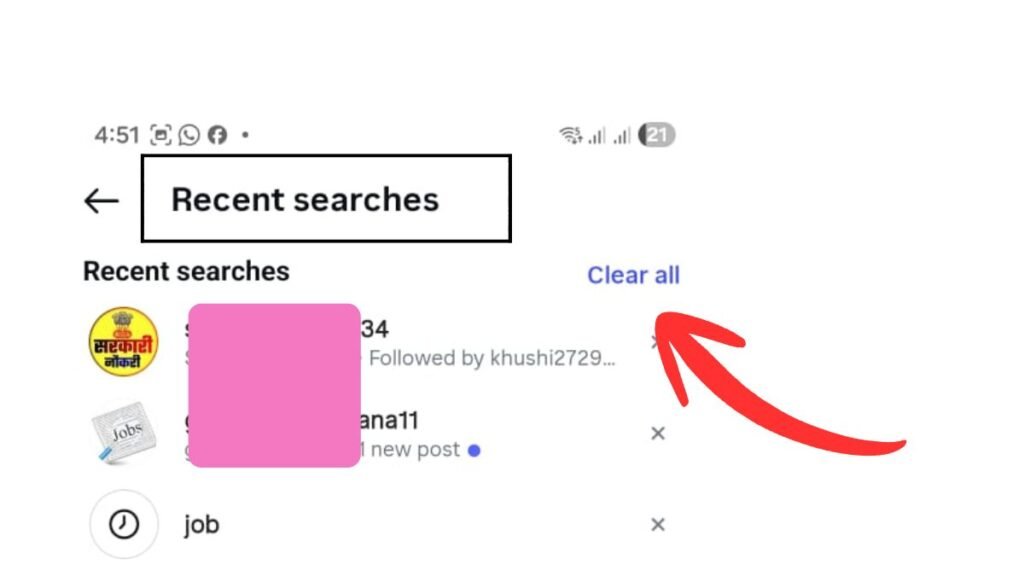
इस तरह आप Instagram Search History Clear Kar सकते है.
Instagram Algorithm Reset Karne Ke Extra Tips
Instagram History की वजह से आपको fresh और new Content देखने मे दिक्कत हो रही थी तो आप Instagram History clear कर दीजिये अब मैं आपको बताउंगी कुछ extra tips जिस से आप Instagram पर और new और relevant Content देख पाएंगे जैसे की :-
- आप अपने Instagram account से Unwanted और irrelevant Profile ko search करना बंद कर दीजिये
- Irrelevant Posts को “Not Interested ” tap करिये
- Search history weekly clear कर दीजिये
- relevant profile serach करिये उन्हें follow करिये और interest content को पूरा देखिये.
FAQ
Q1. Instagram search history permanently delete होती है?
हाँ, manual clear करने के बाद previous searches remove हो जाती हैं।
Q2. Web / PC पर search history clear कर सकते हैं?
Instagram web version में full control नहीं मिलता, best option mobile app है।
Q3. Business account में भी same process है?
हाँ, personal aur professional दोनों accounts में process same है।
Conclusion
आज के इस लेख मे हम ने आपको बताया की कैसे आप Instagram Search History Clear Kerenge. History clear करने का सब से आसान तरीका बताया है अब आप इस तरह से clear all कर के एक साथ अपनी Recent search history delete कर सकते है. आपको हमारा यह लेख कैसा लगा हमें जरूर बताएगा और instagram से related और information जानने के लिए blog के बाकि article भी पढ़ सकते है.
Read More:-
- 10 Step Instagram ka Account Kaise Banaye ? | इंस्टाग्राम में नया अकाउंट कैसे बना सकते हैं (Step-by-Step Guide)
- Instagram Quiet Mode ( Sleep Mode ) Kaise Enable Kare ? Updated Step-by-Step Practical Guide (2026)
- Instagram Broadcast Channel Join Kaise Kare Guide 2026

मेरा नाम Rohit Mourya है मैं इस Blog का Author हूँ मैंने Instagram को खुद इस्तमाल किया है और बहुत कुछ सीखा है अपने अनुभव को share करने के लिए मैंने Insta Soch Blog बनाया है जिस से उन सभी नए Creator की मदद हो सके जो Instagram पर Grow करना चाहते है.